


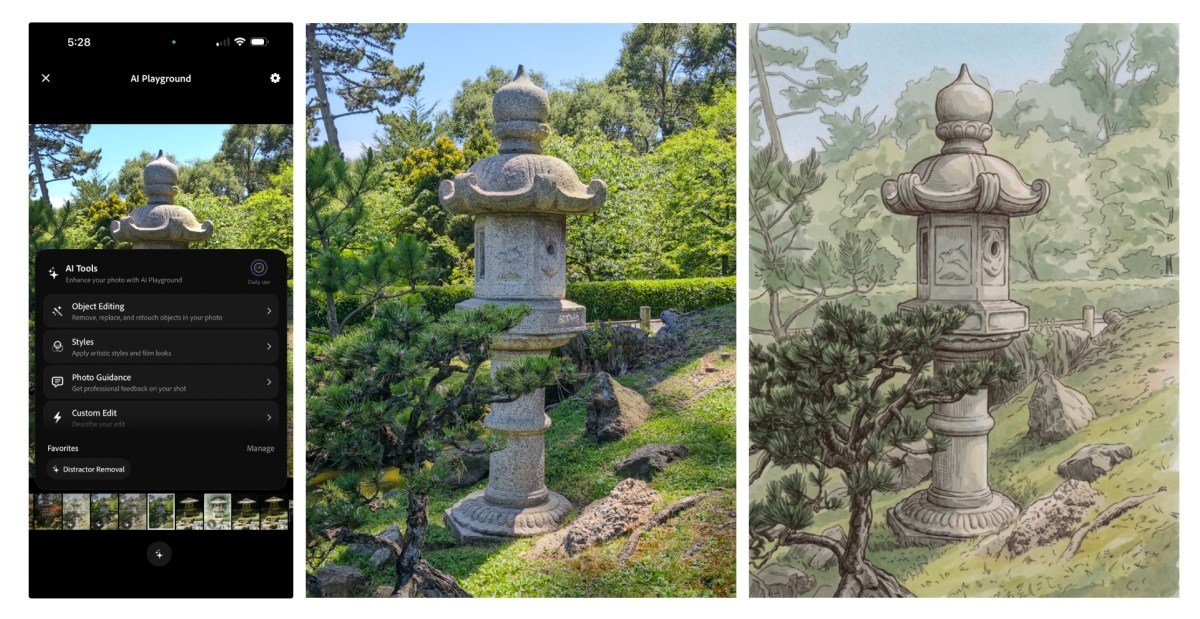
Adobe is adding new AI-powered features to its experimental iOS camera app called Project Indigo, launched last year. The app previously offered professional controls, multi-frame super-resolution, and different shooting modes, and is now adding features that will use LLMs (large language models) to critique photos and provide editing suggestions.
It also adds other AI features such as advanced object removal, creating depth of field and the ability to add different styles to photos.
Marc Levoy, Adobe’s project manager, previously developed Pixel cameras. He said most AI creation tools provide instant-based processing, and often, finding the perfect prompt to tweak a photo or get the right result can be a difficult endeavor. This is why most of the new experimental AI features are buttons that can produce more deterministic results.
For example, Google’s camera coach feature for Pixel phones, launched last year, offered more general framing suggestions. Project Indigo’s features, by comparison, are pretty descriptive and could help you learn some photography tricks, even if you don’t agree with the AI assessment.
There are two features in this category. First is the photo review, which includes a “professional” opinion on framing, lighting, colors and emotional impact.
The second is shooting and editing suggestions, which give you reshooting tips on how to change the frame, exposure, and objects in the viewfinder. For example, the app told me to remove the hexagonal white object in the frame from a photo I took.
A second section tells you how to use an existing photo to enhance it using Adobe Lightroom controls.

Photography apps, including Apple Photos, Google Photos, and Adobe Photoshop, have offered object removal for years. But the feature often depends on the user circling or selecting an object by drawing on the screen, which isn’t perfect every time.
Project Indigo’s new feature gives you toggles to remove things from an image, such as people in the background, trash cans, wires and poles, fences, vehicles, and other clutter. You can also describe a custom object to remove. The results of this feature are quite impressive.
The app removed my friend and the object he was holding from the background without creating strange objects.


The app also lets you use AI to create depth of field for a photo to simulate a blurred background.
With this new update, Adobe is also experimenting with the style transfer feature, which allows you to convert your image into tones like watercolor, pen and ink, ink line with color wash, monochrome and backlit theme. Some styles remind me of the early days of the Prisma app. With advanced models, the results look polished, but style transfer is not a new or useful feature.
Despite Levoy’s criticism of the direct app, Project Indigo has its own feature that lets you describe your edit. Users can use it to perform processing flows that are not available in the predefined tools. But this is also a potential path down the slope.
The company uses Google’s Gemini-based Nano Banana for these functions, but is open to swapping with other models, including its own Adobe Firefly model. These features, grouped under the AI playground tab, are still in beta and only select users will have access to them. These features may never reach a wider audience, but it’s good to see some features that can make people aware of the nuances of photography, rather than just creating more fraud.
When you purchase through links in our articles, we may earn a small commission. This does not affect our editorial independence.
