

Close Menu
TechTost
  • AI
  • Apps
  • Crypto
  • Fintech
  • Hardware
  • Media & Entertainment
  • Security
  • Startups
  • Transportation
  • Venture
  • Recommended Essentials
What's Hot

Error on student admissions website exposed children’s personal details

Co-founders behind Reface and Prisma join hands to improve on-device model inference with Mirai

Rivian owners will soon be able to access vehicle controls using their Apple Watch

Facebook X (Twitter) Instagram
  • About Us
  • Contact Us
  • Privacy Policy
  • Terms and Conditions
  • Disclaimer
Facebook X (Twitter) Instagram
TechTost
Subscribe Now
  • AI

    ‘Toy Story 5’ takes aim at creepy AI toys: ‘I’m always listening’

    21 February 2026

    Great news for xAI: Grok is now very good at answering questions about Baldur’s Gate

    21 February 2026

    UAE’s G42 partners with Cerebra to deploy 8 exaflops of computers in India

    20 February 2026

    Why these startup CEOs don’t think AI will replace human roles

    20 February 2026

    Reliance unveils $110bn AI investment plan as India boosts tech ambitions

    19 February 2026
  • Apps

    India’s Sarvam launches Indus AI chat app as competition heats up

    21 February 2026

    Remember HQ? “Quiz Daddy” Scott Rogowsky is back with TextSavvy, a daily mobile game show

    21 February 2026

    As the browser war heats up, Chrome is adding new productivity features

    20 February 2026

    Google says its AI systems helped prevent Play Store malware in 2025

    20 February 2026

    Mastodon, a decentralized alternative to X, plans to target creators with new features

    19 February 2026
  • Crypto

    Hackers stole over $2.7 billion in crypto in 2025, data shows

    23 December 2025

    New report examines how David Sachs may benefit from Trump administration role

    1 December 2025

    Why Benchmark Made a Rare Crypto Bet on Trading App Fomo, with $17M Series A

    6 November 2025

    Solana co-founder Anatoly Yakovenko is a big fan of agentic coding

    30 October 2025

    MoviePass opens Mogul fantasy league game to the public

    29 October 2025
  • Fintech

    InScope raises $14.5M to solve financial reporting pain

    20 February 2026

    OpenAI deepens India push with Pine Labs fintech partnership

    19 February 2026

    Cash app adds payment links so you can get paid in DMs

    11 February 2026

    MrBeast’s company buys Gen Z fintech app Step

    9 February 2026

    Stripe Alumni Raise €30M Series A for Duna, Backed by Stripe and Adyen Executives

    5 February 2026
  • Hardware

    Joseph C Belden: Last Chance for Innovators to Earn Scaling Privileges

    20 February 2026

    At a critical time, Snap is losing a top spec executive

    20 February 2026

    Freeform Raises $67M Series B to Scale Laser AI Production

    19 February 2026

    India’s Sarvam wants to bring its AI models to phones, cars and smart glasses

    19 February 2026

    Google debuts $499 Pixel 10a

    18 February 2026
  • Media & Entertainment

    Google adds music-making capabilities to its Gemini app

    21 February 2026

    Disrupt 2026 Super Early Bird pricing expires in 1 week

    20 February 2026

    YouTube’s latest experiment brings its AI chat tool to TVs

    20 February 2026

    OpenAI, Reliance partner to add AI search to JioHotstar

    19 February 2026

    SeatGeek and Spotify are teaming up to offer concert ticket discounts within the music platform

    19 February 2026
  • Security

    Error on student admissions website exposed children’s personal details

    21 February 2026

    Ukrainian man jailed for identity theft that helped North Koreans get jobs at US companies

    21 February 2026

    Cellebrite cut off Serbia citing misuse of its phone unlocking tools. Why not others?

    20 February 2026

    FBI says ATM ‘jackpot’ attacks on the rise, hackers net millions in stolen cash

    20 February 2026

    Sex toy maker Tenga says hacker stole customer information

    19 February 2026
  • Startups

    Co-founders behind Reface and Prisma join hands to improve on-device model inference with Mirai

    21 February 2026

    Nominations for the Startup Battlefield 200 are now open

    21 February 2026

    The OpenAI mafia: 18 startups founded by graduates

    20 February 2026

    Nvidia deepens early-stage push into India’s AI startup ecosystem

    20 February 2026

    Kana emerges from stealth with $15M to build flexible AI agents for marketers

    19 February 2026
  • Transportation

    Rivian owners will soon be able to access vehicle controls using their Apple Watch

    21 February 2026

    Lucid Motors is cutting 12% of its workforce as it pursues profitability

    21 February 2026

    New York puts the brakes on robotaxi expansion plan

    20 February 2026

    AI data center boom fuels Redwood’s energy storage business

    20 February 2026

    Tesla avoids 30-day suspension in California after removing ‘Autopilot’

    18 February 2026
  • Venture

    Ali Partovi’s Neo appears to upgrade the throttle model in low dilution terms

    21 February 2026

    Peak XV Raises $1.3B, Doubles In AI As Global India VC Competition Heats Up

    21 February 2026

    General Catalyst commits $5 billion to India over five years

    20 February 2026

    Reload wants to give your AI agents a shared memory

    20 February 2026

    This VC’s best advice for building a founding team

    19 February 2026
  • Recommended Essentials
TechTost
You are at:Home»Security»Your Android phone could have stalkerware — here’s how to remove it
Security

Your Android phone could have stalkerware — here’s how to remove it

techtost.comBy techtost.com20 April 202406 Mins Read
Share Facebook Twitter Pinterest LinkedIn Tumblr Email
Your Android Phone Could Have Stalkerware — Here's How To
Share
Facebook Twitter LinkedIn Pinterest Email

Consumer spyware applications that the secret and continuous monitoring of your personal messages, photos, phone calls and real-time location is a growing problem for Android users.

This guide can help you identify and remove common tracking apps from your Android phone, including TheTruthSpy, KidsGuard and other apps.

READ OUR EXCLUSIVE RESEARCH

Consumer-grade spyware applications are often sold under the guise of child monitoring or family monitoring software, but are referred to as “stalkerware” and “spouseware” for their ability to track and also monitor partners or spouses without their consent. These spyware apps are downloaded from outside the Google Play app store, placed on a phone without a person’s permission, and often disappear from the home screen to avoid detection.

Stalkerware apps rely on abusing built-in Android features commonly used by companies to remotely manage their employees’ work phones or use Android’s accessibility feature to spy on someone’s device.

You may notice your phone acting unusual, running hotter or slower than usual, or using large amounts of network data, even when you’re not actively using it.

Checking to see if your Android device has been hacked can be done quickly and easily.

Before you start

It is important to have a safety plan in place and reliable support if you need it. Keep in mind that removing spyware from your phone will likely alert the person who planted it, which could create a dangerous situation. The Coalition Against Stalkerware offers advice and guidance for victims and survivors of stalkerware.

Please note that this guide only helps you detect and remove spyware, it does not delete the data already collected and uploaded to its servers. Also, some versions of Android may have slightly different menu options. As is typical with any advice, you follow these steps at your own risk.

Check your Google Play Protect settings

Make sure Google Play Protect, a security feature on Android phones, is turned on. Image Credits: TechCrunch

Google Play Protect is one of the best safeguards against malicious Android apps, checking apps downloaded from the Google app store and from external sources for signs of potentially malicious activity. These protections stop working when Play Protect is turned off. It’s important to make sure Play Protect is turned on to make sure it’s working and scanning for malicious apps.

You can check that Play Protect is enabled through the settings of the Play Store app. You can also scan for harmful apps if it hasn’t already been scanned.

Check if accessibility services have been compromised

Stalkerware relies on deep access to your device to access data and is known to abuse Android’s accessibility feature, which by design requires broader access to your operating system and data for screen readers to work and other accessibility features.

Android users who don’t use apps or accessibility features shouldn’t see any apps in their Android settings.

If you don’t recognize a service you’ve received in the Accessibility options, you may want to turn it off in the settings and remove the app. Some stalkerware applications disguise themselves as ordinary-looking applications and are often called “Accessibility”, “Device Health”, “System Service” or other innocuous-sounding names.
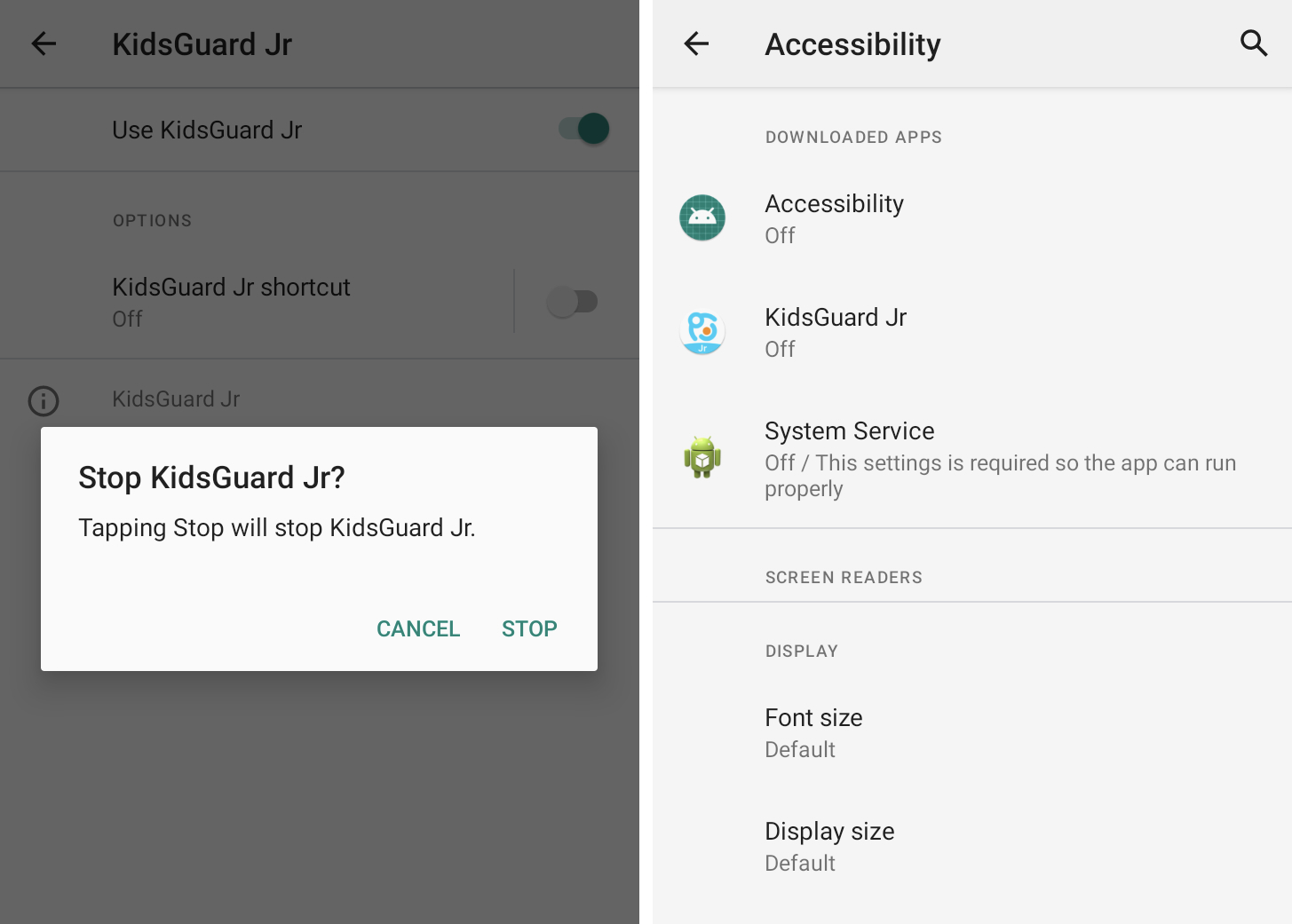
Two side-by-side screenshots showing an app called KidsGuard hacking Android's accessibility feature to spy on unsuspecting users.  The second screenshot shows three stalkerware apps - named Accessibility, KidsGuard and System Service - all in

Android spyware often abuses built-in accessibility features. Image Credits: TechCrunch

Control your access to notifications

As well as accessibility features, Android also allows third-party apps to access and read your incoming notifications, such as allowing smart speakers to read notifications aloud or your car to display notifications on its dashboard. Granting notification access to a stalkerware app allows persistent monitoring of your notifications, which includes messages and other notifications.

You can control which apps have access to your notifications by checking your Android notification access settings under Special app access. Some of these apps you may recognize, such as Android Auto. You can disable notification access for any app you don’t recognize.
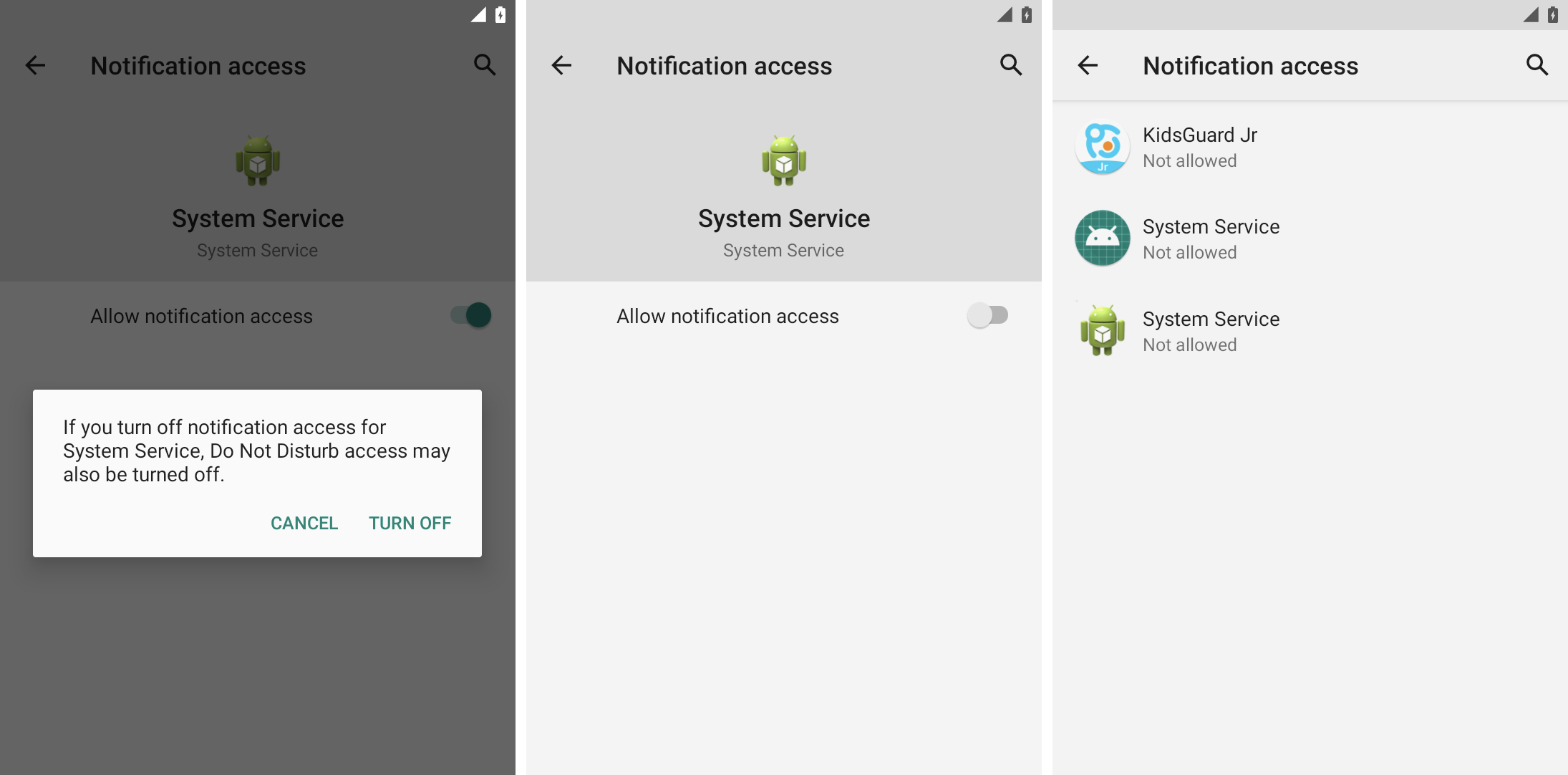
Three screenshots side-by-side, one showing how to disable notification access in Android settings, followed by a screenshot of a stalkerware app called "System service" disabled and the third shows a list of apps under notification access in Settings as they all appear "not allowed."

Spyware uses notification access to read user messages and other notifications. Image Credits: TechCrunch

Check if a device manager app is installed

Other features commonly abused by stalkerware are the Android device management options, which have similar but even broader access to Android devices and user data.

Device management options are commonly used by companies to remotely manage their employees’ phones, such as wiping the phone in case of device theft to prevent data loss. But these features also allow stalkerware apps to monitor your Android screen and device data.
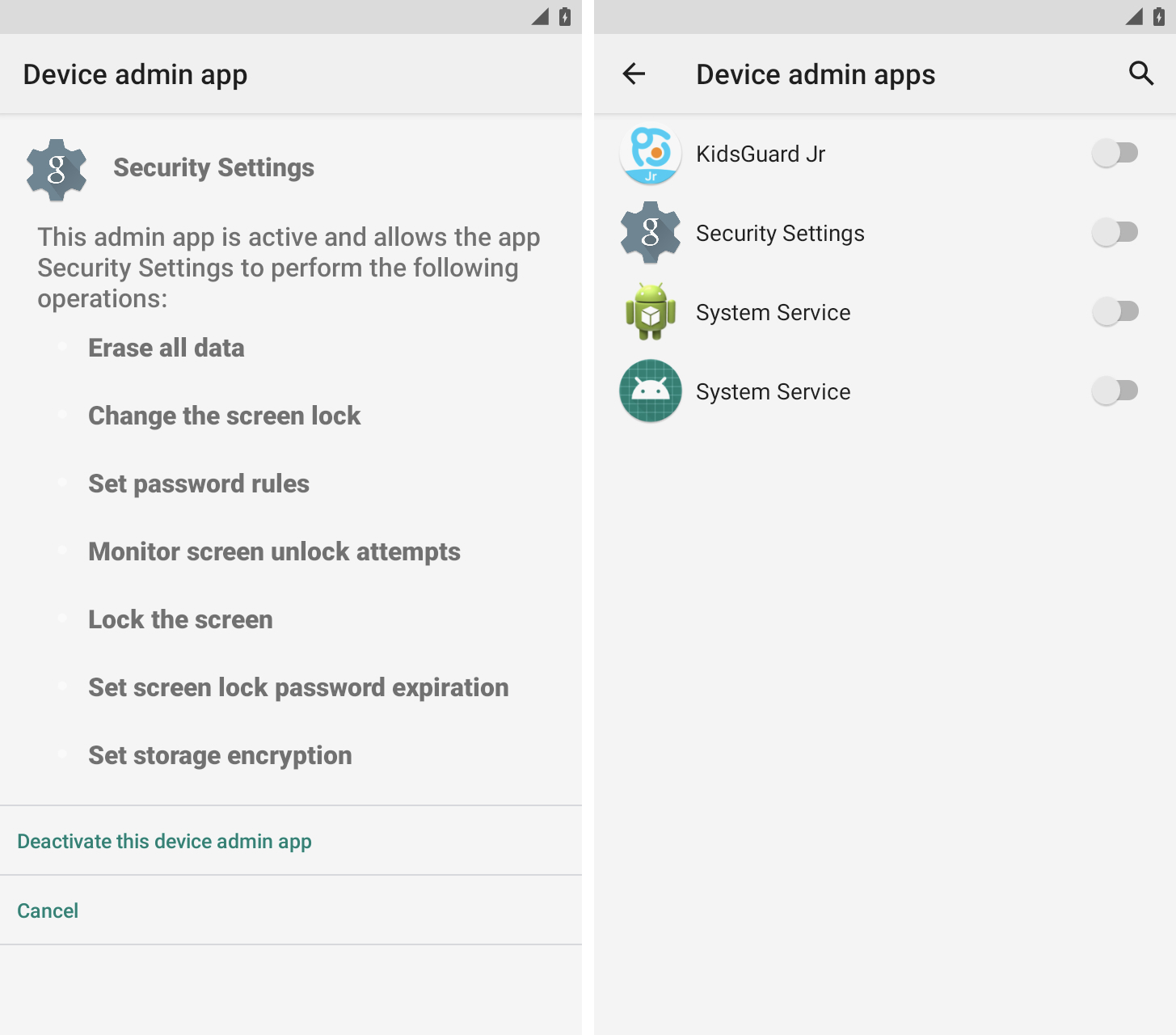
Two screenshots side by side, one showing a noisy display "Security settings" app with full admin control of said Android device by allowing it "delete all data" and "lock the screen." The second screenshot shows the currently installed device manager apps as they all appear as disabled.

An unrecognized item in your device manager app settings is a common indicator of phone tampering. Image Credits: TechCrunch

You can find the device manager app settings in Settings under Security.

Most people won’t have a device manager app on their personal phone, so be aware if you see an app you don’t recognize with something vague and vague like System Service, Device Health, or Device Manager. ” .”

Check apps to uninstall

You may not see a home screen icon for any of these stalkerware apps, but they will still appear in your Android device’s app list.

You can see all installed apps in Android settings. Look for apps and icons you don’t recognize. These apps may also appear to have broad access to your calendar, call logs, camera, contacts, and location data.
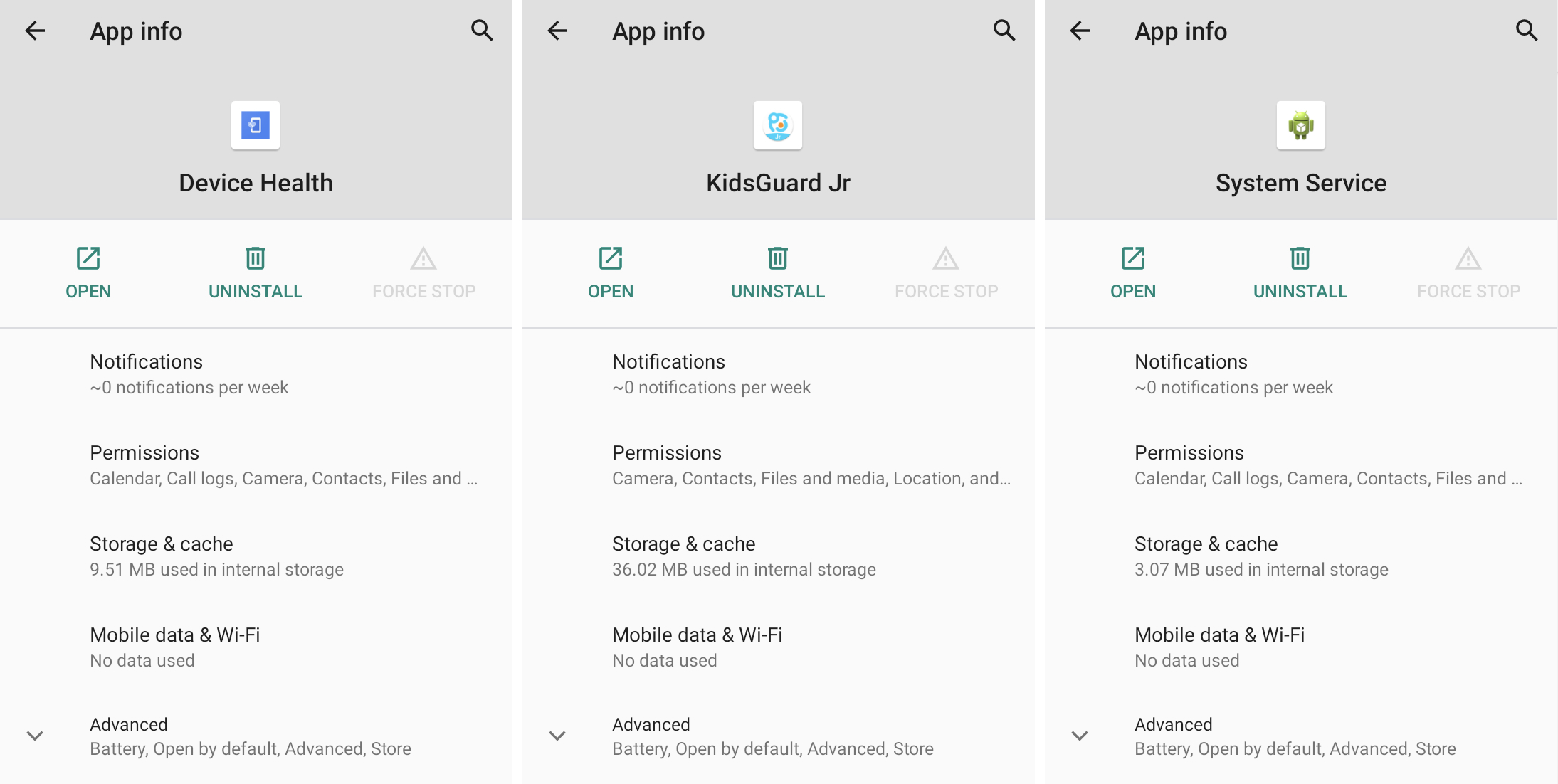
Three side-by-side screenshots, all showing three stalkerware apps disguised as regular, ordinary apps — one called "device health," called another "KidsGuard" and a third called "System service." All of these apps have overly broad permissions to access a user's data.

Spyware applications are designed to match names and icons that have a generic appearance. Image Credits: TechCrunch

Force stopping and uninstalling a stalkerware application will likely notify the person who installed the stalkerware that the application no longer works.

Secure your device

If stalkerware was planted on your phone, there’s a good chance your phone was unlocked, unprotected, or your screen lock was guessed or learned. A stronger screen lock password can help protect your phone from intruders. You should also protect email and other online accounts by using two-factor authentication where possible.


If you or someone you know needs help, the National Family Violence Hotline (1-800-799-7233) provides free, confidential 24/7 support to victims of domestic abuse and violence. If you are in an emergency, call 911. The Coalition Against Stalkerware has resources if you think your phone has been compromised by spyware.


Read more at TechCrunch:

Android cybercrime Google Play heres phone remove Spyware stalkerware Vietnam
Share. Facebook Twitter Pinterest LinkedIn Tumblr Email
Previous ArticleSample Pre-seed pitch deck: Geodesic.Life’s $500k deck
Next Article Fintech CRED secures in-principle approval for a payment aggregation license
bhanuprakash.cg
techtost.com
  • Website

Related Posts

Error on student admissions website exposed children’s personal details

21 February 2026

Ukrainian man jailed for identity theft that helped North Koreans get jobs at US companies

21 February 2026

Cellebrite cut off Serbia citing misuse of its phone unlocking tools. Why not others?

20 February 2026
Add A Comment

Leave A Reply Cancel Reply

Don't Miss

Error on student admissions website exposed children’s personal details

21 February 2026

Co-founders behind Reface and Prisma join hands to improve on-device model inference with Mirai

21 February 2026

Rivian owners will soon be able to access vehicle controls using their Apple Watch

21 February 2026
Stay In Touch
  • Facebook
  • YouTube
  • TikTok
  • WhatsApp
  • Twitter
  • Instagram
Fintech

InScope raises $14.5M to solve financial reporting pain

20 February 2026

OpenAI deepens India push with Pine Labs fintech partnership

19 February 2026

Cash app adds payment links so you can get paid in DMs

11 February 2026
Startups

Co-founders behind Reface and Prisma join hands to improve on-device model inference with Mirai

Nominations for the Startup Battlefield 200 are now open

The OpenAI mafia: 18 startups founded by graduates

© 2026 TechTost. All Rights Reserved
  • About Us
  • Contact Us
  • Privacy Policy
  • Terms and Conditions
  • Disclaimer

Type above and press Enter to search. Press Esc to cancel.