


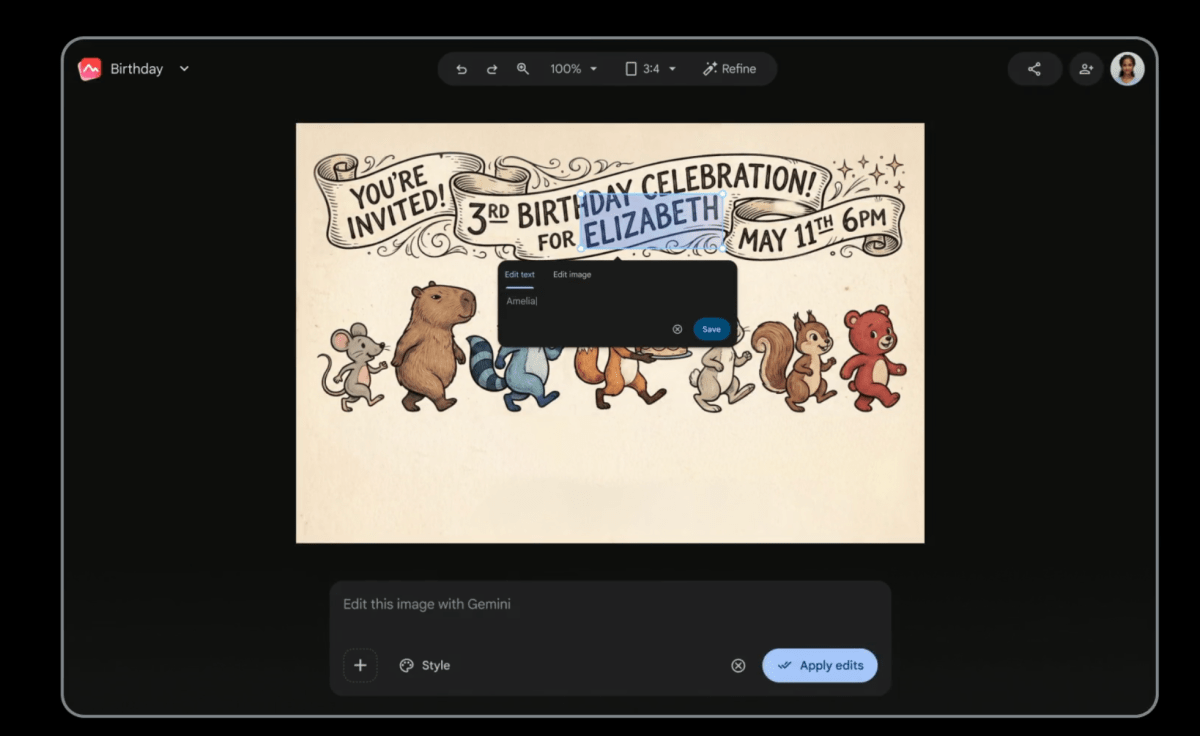
Google announced at its annual Google I/O event on Tuesday that it’s launching Pics, a new AI-powered drawing and image creation app for Google Workspace. The tech giant says it designed the app to be accessible to everyone from teachers to small business owners.
With Pics, users can create everything from social media graphics and invitations to marketing materials and mockups using simple text messages, without the need for editing skills or advanced tools. By giving users an easy way to create graphics, Google is looking to take on popular design apps like Canva, as well as products from AI-powered competitors like Claude Design from Anthropic. Google’s entry into the space signals that AI-powered design is quickly becoming a key competitive arena — with real stakes for any business that depends on visual content.
The new app is rolling out to a group of testers at I/O and will roll out to Google AI Ultra subscribers this summer, Google says.
The company recognizes that although AI models today can create high-quality images, it is still difficult to modify just one part of an image. If you have an image that’s almost perfect, but want to change a small detail, you have to write a whole new prompt and hope the AI doesn’t change too much. That’s why Pics not only creates images but also makes them easy to edit.
Users can enter a prompt and Pics will generate what they need. Gemini powers the editing layer, making every element in a generated design or image fully adjustable. You can write a new prompt to make changes, but you can also just click on the section you want to change and leave a comment — just like leaving comments in Google Docs.
You can also edit directly, without leaving a comment or writing a prompt. For example, if you create a birthday party invitation and want to change the time on the card, you can do it manually.
Pics is powered by Nano Banana 2, which Google says is a great fit for the app because it supports accurate text rendering, real-world knowledge, and detailed visual output. Pics is also integrated with Google Workspace, enabling visual collaboration between its apps.
Once you’re happy with your design, you can download, copy, print or share it with others. You can also give it to someone else for one last round of edits before it’s deleted, Google says.
Stay tuned for the rest of the big Google IO 2026 news
Google Search as you know it is over
Google updates Gemini app to deal with ChatGPT and Claude
Google introduces Gemini Spark, a 24/7 agent assistant with Gmail integration
How to use Google’s new intelligence agents
When you purchase through links in our articles, we may earn a small commission. This does not affect our editorial independence.
